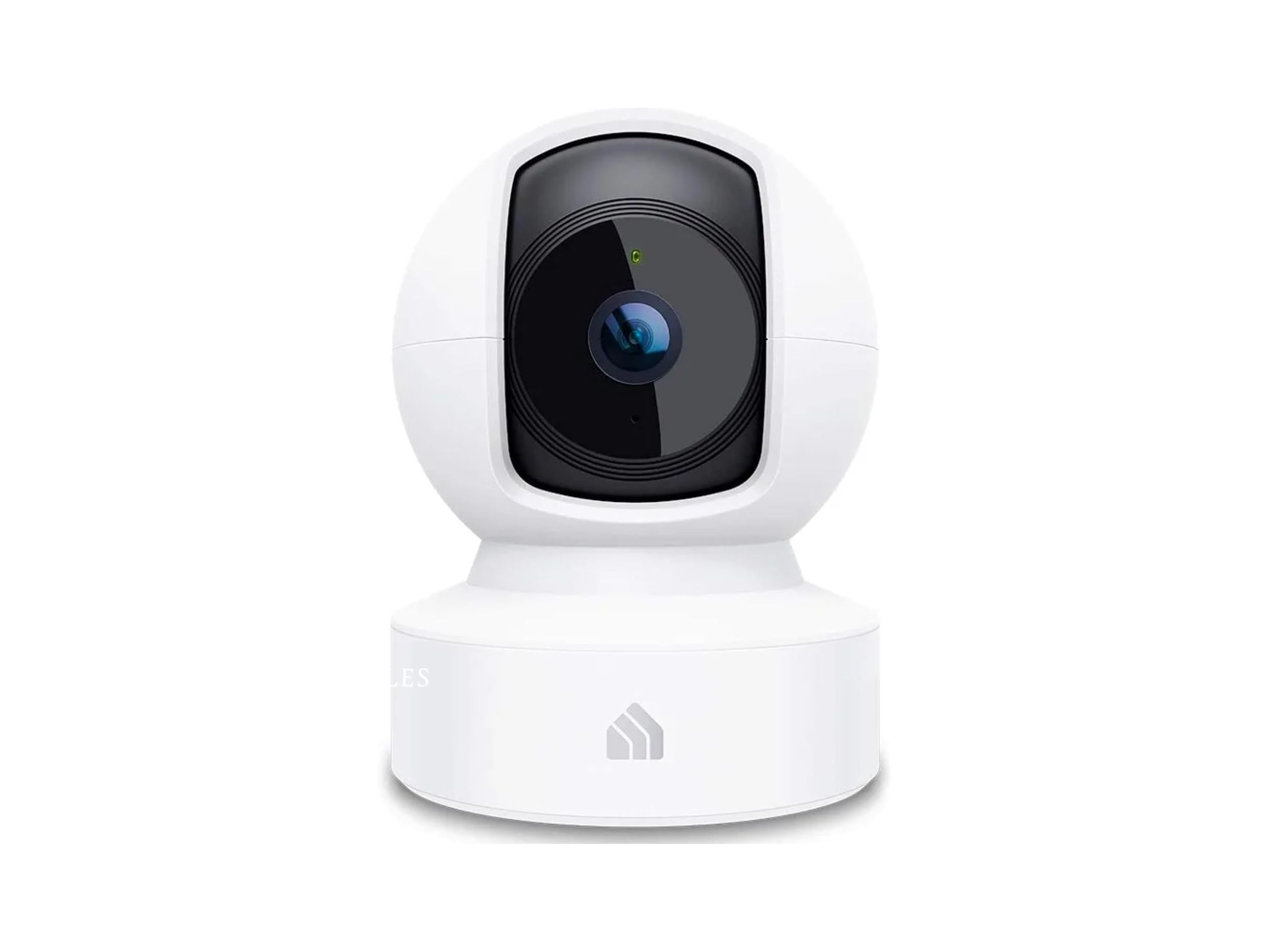
A Kasa Smart Indoor Security Camera can be an affordable way to keep an eye on your home without investing in an expensive security system. Whether you want to monitor pets, check a room while you’re away, or add another layer of visibility to your smart home, the Kasa EC70 offers a useful combination of video monitoring and pan-and-tilt control.
In this review, we’re looking specifically at the Kasa EC70 1080p Indoor Pan/Tilt Security Camera. It combines 1080p video, night vision, two-way audio, motion detection, and local recording options in a relatively compact indoor camera.
We’ll examine its video quality, pan-and-tilt functionality, everyday usability, storage, privacy considerations, advantages and disadvantages, and who should consider buying it in 2026.
Affiliate Disclosure: This article may contain affiliate links. If you purchase through one of our links, we may earn a commission at no additional cost to you.
Kasa Smart Indoor Security Camera: Quick Verdict
Rating: 4.4/5
The Kasa Smart Indoor Security Camera EC70 is an attractive option for people who want straightforward indoor monitoring without spending heavily on a more advanced security-camera system.
Its biggest advantage is the combination of 1080p video and motorized pan-and-tilt movement. Rather than watching only one fixed section of a room, the camera can provide much broader coverage.
TP-Link specifies a 360-degree horizontal viewing range and night vision reaching approximately 30 feet on EC70 versions, although specifications such as storage capacity vary by hardware revision.
Best for: Apartments, home offices, living rooms, pet monitoring and general indoor home monitoring.
Key advantages: Pan/tilt coverage, 1080p video, night vision, two-way audio, motion detection and local storage support.
What Is the Kasa EC70?
The EC70 is an indoor pan-and-tilt Wi-Fi camera from TP-Link’s Kasa smart-home family.
Unlike a fixed camera that points permanently in one direction, the EC70 incorporates a motorized camera mechanism. This allows the viewing direction to be adjusted remotely and makes the device better suited to monitoring a larger room.
The camera records at up to 1920 × 1080 resolution, and current EC70 documentation lists a built-in microphone and speaker for two-way communication.
This makes it more versatile than a simple stationary webcam.
You could use it to monitor a living room while you’re away, check on a pet, watch a home office, or keep an eye on another indoor area where additional visibility is useful.
It is important, however, to remember that the EC70 is designed as an indoor camera. Buyers looking for exterior surveillance should choose a camera specifically designed to withstand outdoor conditions.
Video Quality
One of the first considerations when buying an indoor security camera is image quality.
The Kasa Smart Indoor Security Camera provides 1080p Full HD video, making it suitable for everyday indoor monitoring. TP-Link’s current EC70 documentation lists a maximum resolution of 1920 × 1080 pixels and H.264 video compression.
For normal indoor monitoring, 1080p provides a useful balance between image clarity, bandwidth requirements and storage.
It should provide enough detail for everyday tasks such as checking whether someone has entered a room, seeing what your pet is doing, or monitoring general activity around your home.
However, buyers should set expectations appropriately.
This isn’t a high-end 4K surveillance system designed for maximum forensic detail. The appeal of the Kasa Smart Indoor Security Camera is instead its combination of useful image quality, movement, smart features, and affordability.
Pan and Tilt Coverage
The pan-and-tilt system is one of the most compelling reasons to consider the Kasa Smart Indoor Security Camera instead of a fixed indoor camera.
TP-Link documentation for the EC70 lists a 360-degree horizontal viewing range, allowing the camera to look around a room rather than remaining permanently pointed toward one area.
That flexibility can make a significant difference.
Imagine positioning a fixed camera in a living room. You may get a clear view of the sofa and doorway, but another section of the room could remain outside the frame.
A pan-and-tilt camera gives you more flexibility to inspect different areas from the same installation point.
For the best coverage, place the camera somewhere relatively open and avoid surrounding it with large objects that could obstruct its movement or field of view.
Night Vision
Home monitoring shouldn’t become useless as soon as the lights go off.
The Kasa Smart Indoor Security Camera includes infrared night vision. TP-Link specifies 850 nm infrared illumination with visibility up to approximately 30 feet (10 meters) on current documentation.
That makes the camera suitable for checking rooms at night without leaving the lights on continuously.
Night vision can be particularly useful when monitoring pets, hallways, sleeping areas or other spaces where lights are normally turned off overnight.
As with virtually any infrared security camera, nighttime footage will look different from normal daylight footage. But for general monitoring, the ability to continue seeing the room in darkness is an important feature.
Motion Detection and Tracking
The Kasa Smart Indoor Security Camera isn’t limited to simply displaying a live video feed.
Motion detection allows the camera to identify activity and provide notifications, while motion tracking can help the camera follow movement within its viewing range.
This is particularly useful when you aren’t actively watching the live feed.
For example, if you’re away from home and movement occurs in a monitored room, an alert can prompt you to check what’s happening.
More recent EC70 documentation also lists features such as person detection, baby-crying detection and sound detection, though available capabilities can depend on the specific hardware/software version.
As with most consumer cameras, detection isn’t something I’d treat as infallible. Lighting, positioning and the environment can affect how useful alerts are.
Think of detection as an additional monitoring tool rather than a replacement for a complete professional security system.
Two-Way Audio
The Kasa Smart Indoor Security Camera has a built-in microphone and speaker supporting two-way audio.
This means the camera doesn’t have to be a passive monitoring device.
You can potentially use it to communicate with someone in the room through the Kasa system.
Pet owners may also find this convenient for checking on animals while away from home.
Audio quality shouldn’t be compared with a dedicated communication system, but the feature adds useful versatility to an inexpensive indoor camera.
Local and Cloud Storage
Storage is another important consideration when choosing a security camera.
The Kasa Smart Indoor Security Camera supports local microSD recording, giving users a convenient local storage option instead of relying entirely on cloud recording.
However, check your exact EC70 hardware version before purchasing a memory card.
TP-Link’s older EC70 documentation listed support for microSD cards up to 64 GB, while later versions support significantly larger capacities; current V4-series documentation lists support for cards up to 512 GB.
That’s why we don’t recommend assuming that every EC70 sold online has identical storage specifications.
Cloud recording options are also available through Kasa’s services and may require a subscription depending on the feature.
For buyers trying to minimize recurring costs, local storage is an especially useful feature.
Setup and Everyday Use
The Kasa Smart Indoor Security Camera is designed for simple everyday home monitoring rather than as a complicated professional surveillance system.
Setup and management are handled through TP-Link’s Kasa ecosystem.
Once connected, you can use the app to access features such as the camera feed, recordings, alerts and camera controls.
The EC70 uses 2.4 GHz Wi-Fi, according to TP-Link specifications.
That’s worth knowing before purchasing.
If your network configuration is unusual or heavily optimized around other Wi-Fi bands, verify that your router still provides a compatible 2.4 GHz network for smart-home devices.
The camera also requires power, so placement should take proximity to an outlet into account.
Smart Home Integration
One advantage of choosing a product from an established smart-home ecosystem is integration with other devices and services.
The Kasa ecosystem works with popular voice-assistant platforms, making the Kasa Smart Indoor Security Camera useful as part of a broader connected-home setup.
For NextHouse Living readers already using Kasa smart plugs, switches or other connected products, keeping another device inside the same ecosystem may simplify everyday management.
However, don’t buy a security camera purely because it supports a voice assistant.
Image quality, storage, privacy, reliability and placement are ultimately more important.
Privacy and Security in 2026
Privacy and security are particularly important considerations when evaluating the Kasa Smart Indoor Security Camera in 2026.
TP-Link published a security advisory on July 15, 2026 concerning two information-disclosure vulnerabilities affecting Kasa EC70 v4 and EC71 v4 devices.
According to TP-Link, the issues could allow an attacker on the same local network to access certain sensitive information under specific conditions. TP-Link lists fixed firmware versions and strongly recommends updating affected cameras and keeping the Kasa application updated.
This doesn’t automatically mean you should avoid the EC70.
It means that firmware updates matter.
TP-Link’s EC70 support page currently provides firmware information for multiple hardware revisions, and recent firmware releases specifically mention enhanced security and stability.
Owners should also check TP-Link’s official EC70 support page for the latest firmware and product support information.
If you purchase an EC70 in 2026, we recommend:
- Check the hardware version of your camera.
- Install the latest available firmware during setup.
- Keep the Kasa app updated.
- Use a strong, unique account password.
- Secure your home Wi-Fi network.
- Periodically check for firmware updates.
Connected cameras should never be treated like appliances that you configure once and completely forget.
Where Can You Use the Kasa EC70?
The EC70 is most appropriate for indoor environments.
Good placement options include a living room, apartment, home office, hallway, pet area or study.
Because of its pan-and-tilt movement, a single well-positioned EC70 may provide better coverage than a fixed camera aimed at only one narrow section of the room.
Placement still matters.
Try to position the camera where furniture, walls and other objects won’t block its field of view.
You should also respect privacy. Avoid positioning indoor cameras in locations where family members or visitors reasonably expect privacy, and consider informing household members when indoor cameras are operating.
Pros and Cons
Pros
Wide pan-and-tilt coverage
The motorized design provides substantially more viewing flexibility than a basic fixed indoor camera.
1080p Full HD video
The resolution is suitable for general indoor home monitoring.
Night vision
Infrared night vision provides visibility in dark rooms up to approximately 30 feet under suitable conditions.
Two-way audio
The integrated microphone and speaker add communication capabilities.
Motion detection
Activity alerts make the camera more useful when you aren’t continuously watching the live feed.
Local storage
Compatible EC70 models support microSD recording, helping reduce dependence on paid cloud storage.
Smart-home friendly
It fits naturally into a connected-home environment, particularly for people already using Kasa products.
Cons
Indoor use only
The EC70 isn’t the right choice if you need a weather-resistant outdoor security camera.
1080p rather than higher-resolution video
Buyers wanting 2K or 4K detail should consider newer, higher-resolution alternatives.
Requires power
This isn’t a completely wireless battery-powered camera.
2.4 GHz Wi-Fi
Its network requirements should be checked against your home setup.
Hardware versions vary
Storage capacity and some capabilities differ between EC70 revisions, so buyers should verify the exact version they’re purchasing.
Firmware maintenance is important
Because TP-Link disclosed security issues affecting EC70 v4 in 2026, keeping firmware current should be considered an essential part of owning the camera.
Who Should Buy the Kasa Smart Indoor Security Camera?
The Kasa Smart Indoor Security Camera makes the most sense for someone who wants affordable and flexible indoor monitoring.
It’s particularly appealing for people who want to monitor pets, apartments, home offices or common living areas.
The pan-and-tilt functionality is valuable if you don’t want to install several fixed cameras around the same room.
It also makes sense for people already invested in the Kasa smart-home ecosystem.
If your priorities are straightforward installation, 1080p monitoring, night vision, motion detection, two-way audio and local recording capability, the EC70 offers a compelling collection of features.
Who Should Skip It?
The EC70 isn’t the best camera for everyone.
Skip it if you’re specifically looking for an outdoor security camera, because this model is designed for indoor environments.
You may also want something else if you need extremely high-resolution footage. Newer 2K and 4K security cameras can provide greater detail.
A battery-powered camera will also be more appropriate if you don’t have convenient access to an electrical outlet near the installation location.
Finally, anyone who doesn’t want to maintain firmware on a connected camera may prefer a simpler non-connected monitoring solution.
Frequently Asked Questions
Is the Kasa EC70 a good indoor security camera?
For general indoor monitoring, the EC70 offers a useful combination of 1080p video, pan-and-tilt movement, night vision, two-way audio and motion detection. Its value depends on your expectations and the price available when you purchase.
Does the Kasa EC70 work at night?
Yes. The camera includes infrared night vision. TP-Link documentation specifies visibility up to approximately 30 feet in suitable conditions.
Can the Kasa EC70 record locally?
Yes. EC70 models support microSD recording, but maximum supported card capacity varies by hardware revision. Check your specific version before buying a card.
Does the Kasa EC70 require a subscription?
A subscription may be required for certain cloud-based services, but compatible EC70 versions also support local microSD storage.
Can I use the Kasa EC70 outside?
It is designed as an indoor security camera. For outdoor monitoring, choose a weather-resistant camera specifically rated for exterior installation.
Is the Kasa EC70 secure?
TP-Link disclosed vulnerabilities affecting EC70 v4 in July 2026 and released fixed firmware. Owners of affected hardware should update to the latest firmware and keep the Kasa app current.
Is it suitable as a pet camera?
Yes. The combination of pan-and-tilt control, motion monitoring, night vision and two-way audio makes the EC70 potentially useful for checking on pets while you’re away.
Final Verdict
The Kasa Smart Indoor Security Camera EC70 remains an interesting option for affordable indoor monitoring in 2026.
Its strongest feature isn’t simply its 1080p resolution. It’s the overall combination of pan-and-tilt coverage, night vision, motion monitoring, two-way audio and local storage capability in an accessible consumer smart-home camera.
For apartments, living rooms, home offices and pet-monitoring setups, those features provide considerably more flexibility than a basic fixed camera.
There are compromises. It’s an indoor, powered 1080p camera rather than a wireless 2K or 4K system, specifications vary between hardware revisions, and owners should take firmware maintenance seriously.
The 2026 EC70 v4 security advisory is also something buyers deserve to know about. TP-Link has provided fixed firmware, so users with affected hardware should make sure their cameras are fully updated.
Overall Rating: 4.4/5
Best for: Homeowners and renters looking for an affordable pan-and-tilt camera for general indoor monitoring, pets or smart-home use.
Check Price & Availability on Amazon →